
Description
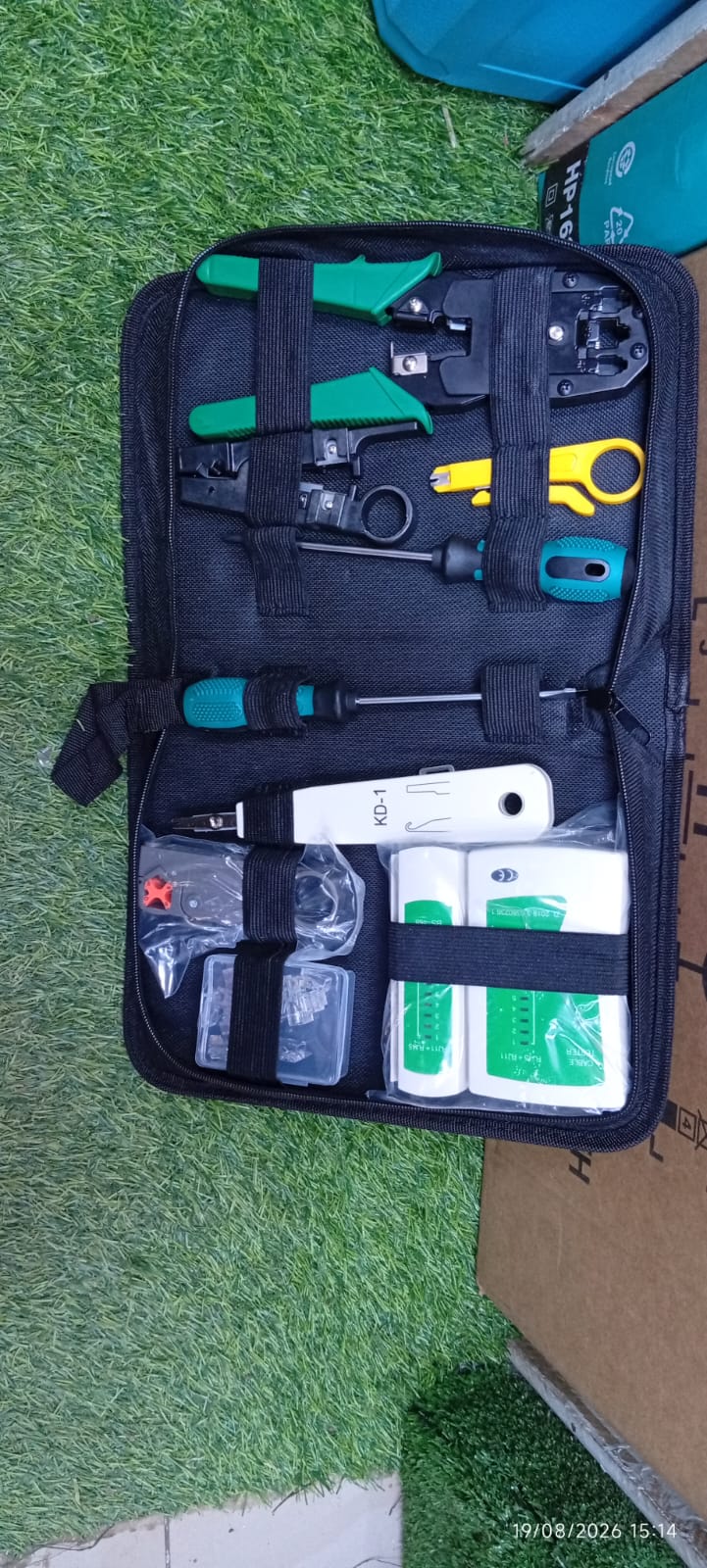
A typical networking toolkit includes an RJ45 crimping tool, LAN cable tester, wire stripper, punch-down tool, screwdrivers and cable connectors. These tools help technicians prepare Ethernet cables, connect wall sockets, install patch panels and troubleshoot network faults.
Networking toolkits are available in different sizes, including 9-in-1, 11-in-1, 15-in-1 and 18-in-1 packages. The exact contents depend on the manufacturer and model.
KSh 2,499–8,500
Reference prices for selected networking toolkits
| Networking Toolkit | Supplier | Advertised Price |
|---|---|---|
| 11-in-1 network repair toolkit | Jumia Kenya | KSh 2,499 |
| Network repair toolkit | Radiant Merchants | KSh 3,450 |
| Network toolkit | Almiria Techstore | KSh 4,000 excluding VAT |
| Paso PS-P18 18-in-1 | Novatech Technologies | KSh 5,999 excluding VAT |
| S-Tek 18-piece toolkit | Supreme Networks | KSh 8,500 excluding VAT, out of stock |
Advertised online prices reviewed in October 2026. Products vary in quality, accessories and availability. VAT and delivery may increase the final amount.
Jumia Kenya+4
The exact selling price at Peter Machines and Spares should be confirmed before ordering.
Networking Toolkit Technical Specifications
| Specification | Common Details |
|---|---|
| Product Name | Networking Tool Kit |
| Tool Category | Network installation and repair |
| Connector Types | RJ45, RJ11 and RJ12 on compatible tools |
| Ethernet Connector | RJ45-style 8P8C modular plug |
| Cable Types | Cat5, Cat5e, Cat6 and selected Cat6a |
| Crimping Tool | Manual modular connector crimper |
| Cable Tester | Main and detachable remote unit |
| Punch-Down Tool | 110 or 66 type, depending on model |
| Wire Stripper | Manual UTP/STP cable stripper |
| Cable Cutter | Integrated or separate |
| Screwdrivers | Included in selected packages |
| Wire Tracer | Available in advanced packages |
| Storage | Zippered pouch or carrying case |
| Power Source | Manual tools; tester may require a battery |
| Applications | LAN, CCTV, telecom and structured cabling |
These are general specifications rather than a guaranteed inventory for every networking toolkit. A professional LAN kit from StarTech, for example, includes a crimper, tester, punch-down tool, stripper and connectors, while other kits add pliers and screwdrivers.
Main Tools Included in a Networking Toolkit
Used to attach compatible modular plugs to Ethernet cables. Many crimpers also include cutting and stripping functions.
Checks conductor continuity, wiring sequence and certain connection faults. A basic tester does not measure internet speed or certify Cat6 performance
Inserts individual conductors into insulation displacement terminals on compatible keystone jacks and patch panels
4. Network Cable Stripper
Removes the outer cable jacket without unnecessarily damaging the internal twisted pairs.
Other Common Accessories
More complete toolkits may include cable cutters, long-nose pliers, screwdrivers, modular connectors, RJ45 protective boots, spare punch-down blades and a carrying case.
For example, the StarTech CTK400LAN professional kit includes RJ11 connectors, RJ45 connectors and protective boots alongside its main installation tools
What Is Each Networking Tool Used For?
| Tool | Main Function |
|---|---|
| RJ45 crimper | Attaches modular plugs to Ethernet cables |
| LAN cable tester | Checks wiring continuity and conductor order |
| Punch-down tool | Terminates wires in network sockets and patch panels |
| Wire stripper | Removes cable insulation |
| Cable cutter | Cuts cables to the required length |
| RJ45 connectors | Connect Ethernet cables to compatible equipment |
| RJ11 crimper | Terminates compatible telephone cables |
| Screwdriver | Opens covers and secures fittings |
| Wire tracer | Helps identify cables in a bundle |
| Carrying case | Organises and protects the tools |
Networking Toolkit for Cat5e, Cat6 and Cat6a Cables
Different Ethernet cable categories are used in homes, offices, schools and commercial buildings.
| Cable Category | Common Network Capability | Typical Application |
|---|---|---|
| Cat5e | 1Gbps over 100m | Home and office networks |
| Cat6 | 1Gbps over 100m; 10Gbps over shorter distances | Offices, CCTV and network installations |
| Cat6a | 10Gbps over 100m | High-performance structured cabling |
Actual performance depends on the entire cabling system, installation quality and connected equipment.
Not every RJ45 crimper or connector works with every cable category. Cat6a cables, for example, may require connectors designed for their larger conductor and jacket dimensions.
How to Make an Ethernet Cable Using a Networking Toolkit
A networking toolkit is especially useful for preparing Ethernet patch cables.
Step 1: Measure and Cut the Cable
Measure the required cable length and cut it cleanly using a suitable cutter.
Avoid pulling, crushing or sharply bending the cable.
Step 2: Strip the Outer Jacket
Remove enough of the outer jacket to prepare the conductors.
Avoid damaging the insulation of the individual wires.
Step 3: Arrange the Wires
Ethernet cables commonly use the T568A or T568B wiring arrangement.
The following table shows the correct conductor order when looking at the plug contacts with pin 1 on the left.
| Pin | T568A | T568B |
|---|---|---|
| 1 | White/Green | White/Orange |
| 2 | Green | Orange |
| 3 | White/Orange | White/Green |
| 4 | Blue | Blue |
| 5 | White/Blue | White/Blue |
| 6 | Orange | Green |
| 7 | White/Brown | White/Brown |
| 8 | Brown | Brown |
For a normal straight-through Ethernet cable, use the same standard at both ends.
Keep the wire pairs twisted as close to the termination as practical to help preserve cable performance.
Step 4: Insert the Wires into the RJ45 Plug
Make sure each conductor enters the correct channel.
Use a connector compatible with the cable’s conductor type and diameter.
Step 5: Crimp the Connector
Insert the plug into the appropriate crimping slot and operate the tool according to its instructions.
Check that the connector is securely attached and that the cable jacket is properly retained.
Step 6: Test the Cable
Connect both ends to the LAN cable tester.
Check for correct pin sequence, continuity, opens, shorts and crossed wires.
A basic continuity test is useful for detecting common wiring faults, but it does not certify cable bandwidth or performance.
Applications of Networking Toolkits in Kenya
1. CCTV Camera Installation
Networking toolkits are useful for installing IP cameras connected through Ethernet cables.
Technicians use the crimper to terminate suitable cables and the tester to check the connections between cameras, switches and network video recorders.
2. Office Network Installation
IT technicians use networking toolkits to connect office computers, printers, switches, routers and access points.
Punch-down tools are especially useful when installing network wall outlets and patch panels.
3. Internet and Wi-Fi Installation
Networking tools help installers prepare cables for routers, network switches and wireless access points.
They are also useful for repairing damaged Ethernet connectors.
4. School and Institution Networks
Schools, colleges and offices often require several network outlets.
A complete toolkit helps technicians terminate and check cables across multiple rooms.
5. Telecommunications Maintenance
RJ11- and RJ12-compatible tools can assist with suitable telephone and communication wiring.
A wire tracer is useful for identifying cables, provided the instrument is suitable for the circuit.
6. Home Networking
Homeowners and technicians can use networking toolkits to install wired connections for computers, smart TVs, routers and network access points.
Networking Toolkit vs RJ45 Crimping Tool
| Feature | Networking Toolkit | RJ45 Crimper Only |
|---|---|---|
| Cable Crimping | Yes | Yes |
| Cable Stripping | Usually | Sometimes |
| Cable Testing | Usually | No |
| Punch-Down Work | Selected kits | No |
| Cable Fault Checking | Basic tester included | No |
| Carrying Case | Usually | Not always |
| Best For | Complete installation and repairs | Basic cable termination |
A complete networking toolkit is the better option for technicians who regularly install and troubleshoot networks.
A standalone crimper may be sufficient for someone who only needs to replace an occasional Ethernet plug.
How to Choose the Best Networking Toolkit in Kenya
Before buying, consider the following factors.
RJ45 compatibility: Confirm that the crimper supports the connectors you plan to use, including standard or pass-through plugs.
Cable category: Check whether the tools and connectors are suitable for Cat5e, Cat6 or Cat6a cables.
LAN tester: Choose a kit with a tester that can identify common wiring faults.
Punch-down tool: Look for a compatible 110 or 66 blade if you install wall outlets or patch panels.
Wire tracing: Consider a toolkit with a tone generator and probe if you frequently identify cables in large installations.
Tool quality: Inspect the crimper mechanism, cutting blades, grips and carrying case.
Replacement parts: Check whether crimping blades, punch-down blades and modular connectors are available separately.
Networking Toolkit Maintenance Tips
Proper maintenance helps extend the life of the tools.
-
Clean the crimper after use.
-
Remove cable insulation scraps from cutting areas.
-
Inspect cutting blades for damage.
-
Keep the punch-down tool clean.
-
Replace worn blades when necessary.
-
Remove tester batteries before long-term storage if recommended.
-
Store connectors in a dry container.
-
Keep the toolkit away from water.
-
Return each tool to its case after use.
Do not use ordinary networking tools on live mains electrical wiring. Before testing or tracing cables, confirm that the circuit is safe and compatible with the instrument.
Common Networking Cable Problems and Solutions
| Problem | Possible Cause | Recommended Action |
|---|---|---|
| No network connection | Incorrect wiring or damaged cable | Test cable continuity and pin order |
| Tester shows open circuit | Broken conductor or poor termination | Inspect and remake the termination |
| Tester shows crossed wires | Incorrect conductor arrangement | Check T568A/T568B order |
| Connection works intermittently | Loose connector or cable damage | Inspect connector and cable |
| Slow network speed | Cable quality, termination or equipment issue | Check the full network link |
| PoE camera does not power on | Cable fault or power compatibility issue | Check wiring and PoE equipment |
| Punch-down connection fails | Incorrect tool or incomplete termination | Inspect the jack and reterminate |
A basic LAN tester cannot diagnose every network problem. Advanced faults may require a cable qualifier, certification tester or network diagnostic equipment.
Where to Buy Networking Toolkit in Kenya
Peter Machines and Spares
Nairobi, Kenya
0719276999
Peter Machines and Spares supplies hand tools, power tools, electrical equipment and machinery to customers in Kenya.
Contact the business to confirm the available networking toolkit model, number of pieces, selling price, warranty and delivery arrangements.
Frequently Asked Questions About Networking Toolkits in Kenya
What is a networking toolkit?
A networking toolkit is a set of tools used to install, terminate, test and repair Ethernet and telephone cables.
How much is a networking toolkit in Kenya?
Basic networking toolkits are advertised from approximately KSh 2,499, while more complete professional kits can cost KSh 5,999–8,500 or more, depending on the contents and brand.
Does a networking toolkit include an RJ45 crimper?
Most complete networking toolkits include an RJ45 crimping tool. Some also support RJ11 and RJ12 connectors.
Can a networking toolkit be used for CCTV installation?
Yes. It is useful for terminating and testing Ethernet cables used by IP CCTV cameras and network video recorders.
Does a networking toolkit support Cat6 cable?
Many kits support Cat6 cable, provided the crimper and connectors are compatible with the cable.
What is a LAN cable tester used for?
It checks wiring continuity and conductor order and helps identify common cable faults.
Can a networking toolkit measure internet speed?
No. A basic networking toolkit does not measure internet speed. A separate network testing device or software is needed.
What is the difference between RJ45 and RJ11?
RJ45 commonly refers to the 8P8C modular connector used for Ethernet connections, while RJ11 is commonly used for telephone connections.
What is a punch-down tool used for?
It inserts conductors into compatible IDC terminals on patch panels and network wall outlets.
Is an 11-in-1 networking toolkit enough for beginners?
Yes, if it includes a suitable RJ45 crimper, cable stripper and LAN tester. These cover many basic Ethernet cable installation tasks.
Which networking toolkit is best for professional technicians?
A toolkit with a quality crimper, cable tester, punch-down tool, stripper, cutter and wire tracer is a useful starting point for professional installation work.
Where can I buy a networking toolkit in Nairobi?
Contact Peter Machines and Spares on 0719276999 or visit the company’s website to enquire about available models and current prices.
SEO Metadata
SEO Title: Networking Toolkit in Kenya 2026 | Prices & Features
Meta Description: Buy a networking toolkit in Kenya. Compare 2026 prices, RJ45 crimpers, LAN cable testers, punch-down tools and accessories. Call 0719276999.
Focus Keyword: Networking Toolkit in Kenya
Secondary Keywords: Network tool kit price in Kenya, RJ45 crimping tool kit, LAN cable tester kit, CCTV installation tools, network repair toolkit Nairobi, Cat6 networking tools.
Suggested URL Slug: networking-tool-kit-in-kenya
Suggested Product Category: Hand Tools / Networking and Electrical Tools
I can also create a networking toolkit advertising flyer for your website, Facebook and WhatsApp.
Reviews
There are no reviews yet.